 PCOS Weight Loss
Rate My Meal Out of 10: How the Score Works
This guide explains how the 0–10 meal score is built from protein, fiber, added sugar and processing, with worked examples and a clear note on what's stored on the phone versus what a meal photo sends off it.
Published · Updated
Quick answer
To rate my meal out of 10, the app scores protein, fiber, added sugar and how processed the food is from a photo or typed numbers. Logged entries are stored on the phone; a meal photo is also sent to the app's server and OpenAI to identify food, then no copy is kept.
Key takeaways
- The meal score runs 0 to 10, built from protein, fiber, added sugar and how processed the food is.
- Protein and fiber each count for 30% of the score; added sugar and quality count 20% each.
- Meals, weight, cycle days and symptoms you log are stored on the phone, with no account needed.
- A meal photo is sent to the app's server and OpenAI to identify the food, then no copy is kept.
- Logging a meal by hand instead of a photo sends nothing off the phone.
Ask PCOS Weight Loss to rate my meal out of 10 and the app returns a number built from four parts of what's actually on the plate, not a judgment on it. Snap a photo of a meal or type the numbers in yourself, and it hands back that score plus one food idea to try next.
The same four-part math runs whether you're scoring a quick snack or a full dinner plate, so the number means the same thing no matter what you're rating that day. It's free to start, and no account is needed to score a meal out of 10 for the first time.
What goes into a meal score out of 10?
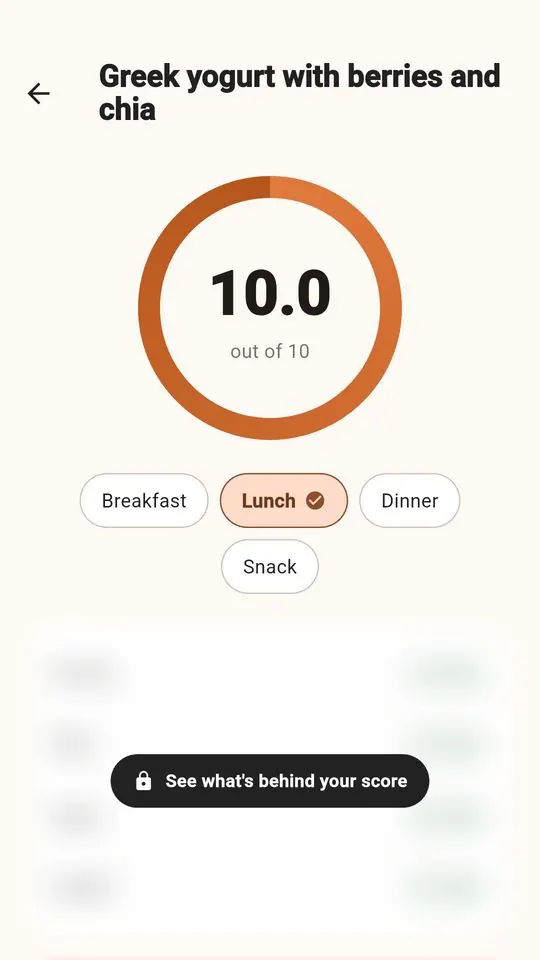
The score is built from four parts: protein (30% of the score), fiber (30%), added sugar (20%) and quality — how processed the food is (20%). Protein is compared with a reference of 7 g per 100 kcal, fiber with a reference of 2 g per 100 kcal, and added sugar with a flat reference of 12 g, where lower added sugar scores higher.
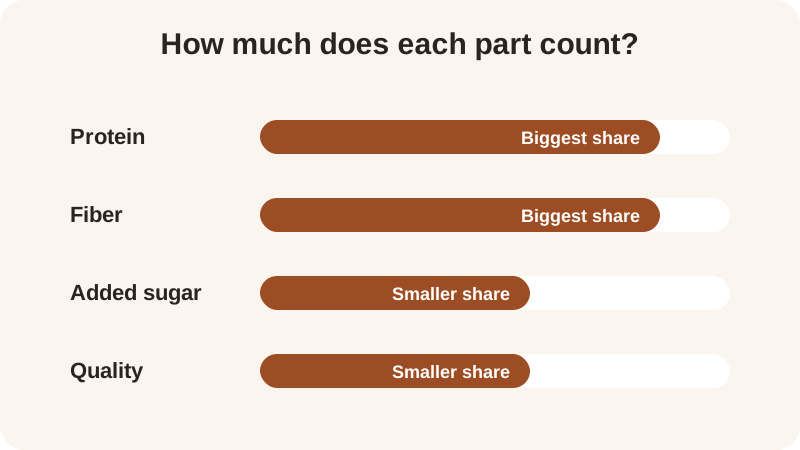
These are general nutrition references this score uses, not clinical targets to hit at every meal. The quality part sorts food by calories into three groups: minimally processed counts 1.0, processed counts 0.6, and ultra-processed counts 0.15.
All four parts are combined unrounded, and only the final score is rounded for display, so a meal that looks close to a round number on paper can still land a few tenths either side once every part is factored in. The full breakdown, including how photo estimates feed into each part, is on the how the score works page.
How do you work out a meal's score yourself?
Take the protein and fiber in grams, divide each by the calories, and multiply by 100 — that gives you grams per 100 kcal to compare against the references above. Turkey Chili, one of the site's recipes, has about 36 g protein, 13 g fiber and 480 kcal: that's roughly 7.5 g protein per 100 kcal, just above the 7 g reference, and about 2.7 g fiber per 100 kcal, above the 2 g reference. Combined with its added sugar and quality parts, it lands at a meal score of 9.3.
Run the same arithmetic on a lighter meal and the pattern holds. Apple with Almond Butter has about 6 g protein, 6 g fiber and 220 kcal: about 2.7 g protein per 100 kcal and about 2.7 g fiber per 100 kcal too — both below their references, which is part of why this one scores 6.8 rather than higher. Neither meal is better or worse to eat; the arithmetic is only showing which one is denser in protein and fiber relative to its calories, not which one belongs on a plate and which doesn't.
| Meal | Protein per 100 kcal (about) | Fiber per 100 kcal (about) | Meal score |
|---|---|---|---|
| Edamame with Sea Salt | 8.9 g | 4.2 g | 10.0 |
| Turkey Chili | 7.5 g | 2.7 g | 9.3 |
| Lentil & Spinach Soup | 5.9 g | 4.1 g | 9.2 |
| Overnight Oats with Chia | 3.7 g | 2.6 g | 7.6 |
| Apple with Almond Butter | 2.7 g | 2.7 g | 6.8 |
The site has twelve recipes in total, each listed with its own 0–10 score, including the full Turkey Chili recipe. If you want to test your own meal's numbers instead of working the arithmetic by hand, the meal score calculator does the same math for you in a few taps.
What's a realistic score to expect, and does the number change by tracking mode?
The 0–10 meal score itself is the same whether you're in Gentle Mode or Weight Loss Mode — only the context shown around it changes. Gentle Mode has no calories and no scale anywhere in the app, so what you see is the score, the protein and fiber behind it, and nothing else layered on top. Weight Loss Mode shows that same score next to calories, macros and a weight trend, for anyone who wants that extra layer of detail alongside the four parts.
Across the twelve recipe examples on this site, scores range from 6.8 up to 10.0, mostly sitting higher when protein and fiber per 100 kcal are both above their references and added sugar is low. A meal doesn't need to hit every reference at once to score reasonably well — the four parts are weighted and combined, not pass-or-fail, so a strong fiber number can offset a more modest protein number and the final figure still lands somewhere respectable.
If fiber is the part you're watching most closely from meal to meal, the fiber tracker scores every meal on that part specifically. The app's five rings — protein, fiber, movement, sleep and meals — sit alongside the meal score if you want to look at a whole day rather than a single plate, separate from the 0–10 score itself.
Is my meal data private when I score a meal out of 10?
Meals, weight, cycle days and symptoms you log are stored on the phone, and there's no account to set up before you can start. A meal photo works a little differently from a hand-typed entry: it's sent to the app's server and on to OpenAI to identify the food, and no copy is kept afterward.
The app has no barcode scanner and no nutrition-label reader, and the portion shown on the score screen is editable each time you use it; it doesn't remember a portion for the next photo you take. Nutrition figures pulled from a meal photo are estimates, so it's worth treating a score of 7.8 and a score of 8.1 as roughly the same ballpark rather than a meaningful difference worth chasing meal after meal.
Whether you check one meal's score out of curiosity on a quiet evening or log most of what you eat across a week, the number is meant to describe what's on the plate in front of you, not to pass or fail it.
Frequently asked questions
What four parts make up a meal score out of 10?
The score combines protein and fiber (30% each), added sugar (20%) and quality, how processed the food is (20%). Protein is compared with 7 g per 100 kcal, fiber with 2 g per 100 kcal, and added sugar with a flat 12 g reference, where lower added sugar scores higher.
Is my meal data private when I score a meal out of 10?
Meals, weight, cycle days and symptoms you log are stored on the phone, and there's no account to set up. A meal photo is sent to the app's server and on to OpenAI to identify the food, then no copy is kept; logging a meal by hand sends nothing off the phone.
Does the score change between Gentle Mode and Weight Loss Mode?
No — the 0 to 10 score itself is identical in both. Gentle Mode shows the score with no calories and no scale anywhere; Weight Loss Mode shows that same score next to calories, macros and a weight trend.
What's a typical score for a meal?
Across the site's twelve recipes, scores range from 6.8 to 10.0, usually higher when protein and fiber per 100 kcal sit above their references and added sugar is low. The four parts are weighted together, not pass-or-fail, so no single part needs to be perfect for a meal to score reasonably well.
Can I score a meal by typing the numbers instead of taking a photo?
Yes — type in protein, fiber, calories and added sugar directly, and the app returns the same 0 to 10 score. Typing numbers by hand sends nothing off the phone, unlike a photo, which is sent to the app's server and OpenAI to identify the food.
General nutrition information, not medical advice. Figures are estimates. Talk to a doctor or dietitian about your own needs.