 PCOS Weight Loss
How to Stop Counting Calories and Still Lose Weight
This guide shows how to swap daily calorie counting for the meal score's protein, fiber, added sugar and quality parts, using Gentle Mode or Weight Loss Mode in PCOS Weight Loss.
Published
Quick answer
How to stop counting calories and still lose weight: track the meal score's protein, fiber, added sugar and quality parts instead, with an optional weight trend in Weight Loss Mode.
Key takeaways
- The meal score replaces calories with protein, fiber, added sugar and quality parts.
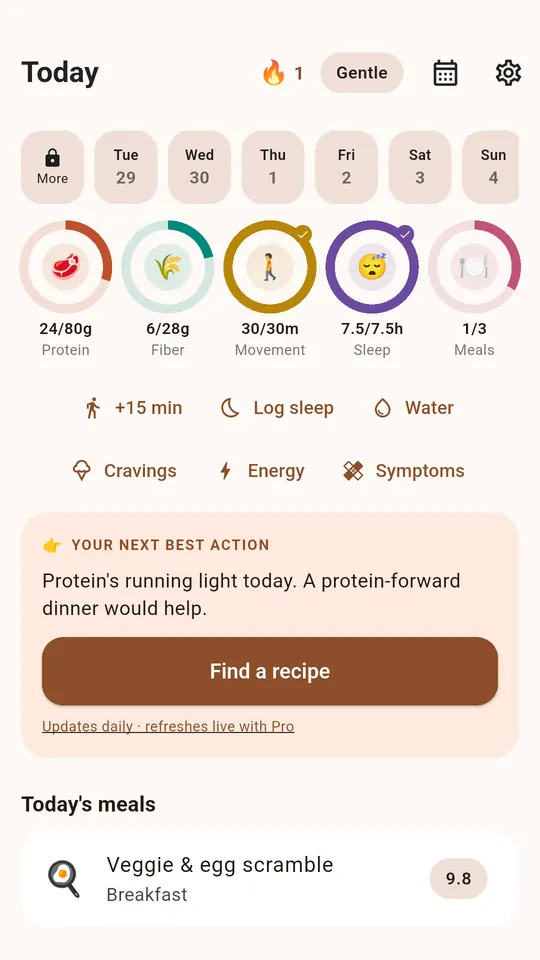
- Gentle Mode shows no calories and no scale anywhere in the app.
- Weight Loss Mode keeps a weight trend next to the score if you choose to track it.
- Logging a meal by hand is free with no daily limit, unlike photo scoring.
- The score's references are general nutrition references, not clinical targets.
How to stop counting calories and still lose weight comes down to swapping a daily calorie total for a meal score built from protein, fiber, added sugar and how processed a meal is. You can track that score with or without calories, and still watch a weight trend if you choose to.
What do you track instead of calories?
Weight Loss Mode and Gentle Mode both run on the same 0–10 meal score, but they differ in what else shows on the screen. Weight Loss Mode adds calories, macros and a weight trend next to the score; Gentle Mode shows neither calories nor a scale anywhere in the app.
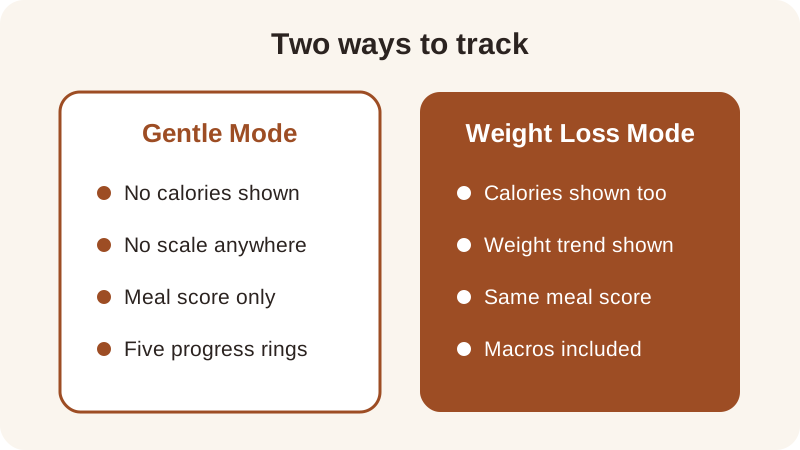
Switching to Gentle Mode doesn't erase any numbers from a meal — it just removes calories and weight from the display, so the score leans entirely on grams of protein, grams of fiber, added sugar and how processed the plate is. That's one route to lose weight without counting calories day to day: let the score be the feedback instead of a running calorie tally.
How do you switch from counting calories to a meal score?
Moving from a calorie total to a meal score is less about a new rule and more about which number you look at first. Here's a simple sequence for the first week.
- Log a meal, by photo or by hand — logging by hand is free with no daily limit, and sends nothing off the phone.
- Look at the four parts of the score first — protein, fiber, added sugar and quality — before looking at calories.
- Try Gentle Mode for a few days so the score appears with no calorie number and no scale anywhere on screen.
- Use the five rings — protein, fiber, movement, sleep and meals — as the day's shape instead of a calorie target; they're progress rings, not part of the score itself.
- Turn Weight Loss Mode back on only if a weight trend next to the score is something you want to see.
None of these steps requires giving up tracking altogether — it's a swap in what the main number is, not a decision to stop watching food at all.
How does the meal score work without calories?
The meal score runs 0 to 10 and combines four parts: protein and fiber each count for 30% of the score, added sugar counts for 20% and quality — how processed the food is — counts for the last 20%. The protein reference is 7 g per 100 kcal, the fiber reference is 2 g per 100 kcal, and the added-sugar reference is a flat 12 g, with lower added sugar scoring higher. These are general nutrition references this score uses, not clinical targets, and the full math is on the how the score works page.
A worked example: Turkey Chili has about 36 g of protein and 13 g of fiber in roughly 480 kcal. That's 36 ÷ 480 × 100 ≈ 7.5 g of protein per 100 kcal and 13 ÷ 480 × 100 ≈ 2.7 g of fiber per 100 kcal — both just above the score's references, which is part of why the recipe scores 9.3. Apple with Almond Butter, by comparison, has about 6 g protein and 6 g fiber in 220 kcal: fiber per 100 kcal is similar, but protein per 100 kcal works out lower, and the recipe scores 6.8.
| Recipe | Protein | Fiber | Calories | Meal score |
|---|---|---|---|---|
| Edamame with Sea Salt | 17 g | 8 g | 190 kcal | 10.0 |
| Turkey Chili | 36 g | 13 g | 480 kcal | 9.3 |
| Lentil & Spinach Soup | 20 g | 14 g | 340 kcal | 9.2 |
| Apple with Almond Butter | 6 g | 6 g | 220 kcal | 6.8 |
None of these scores is a verdict on the food — they only show how the four parts add up once protein, fiber, added sugar and quality are run through the reference math. You can test your own plate the same way in the meal score calculator, or build a day around scored recipes using the meal plan page.
Can you still watch a weight trend without counting calories?
Yes, but only if you choose Weight Loss Mode — it shows calories, macros and a weight trend right next to the meal score, so the trend doesn't disappear just because you stop doing calorie arithmetic by hand. Gentle Mode removes both calories and the scale entirely, so if a weight trend is something you want to keep an eye on, that lives in Weight Loss Mode rather than Gentle Mode.
Either mode also tracks the five rings — protein, fiber, movement, sleep and meals — as a day's shape, separate from the 0–10 meal score itself. A meal logged by photo sends that photo to the app's server and on to a food-identification service with no copy kept, while logging by hand sends nothing off the phone at all, and meals, weight and any symptoms you log stay stored on the phone either way.
If logging a meal by photo feels like extra friction some days, logging by hand is free, has no daily limit, and still feeds the same protein, fiber, added sugar and quality math — see logging meals without a scale for portion estimates that skip the kitchen scale too. For a broader look at tracking without a calorie total day to day, the PCOS app without calorie counting guide covers the same ground from a different angle.
Frequently asked questions
Can I lose weight without counting calories at all?
Yes — Gentle Mode scores each meal from protein, fiber, added sugar and quality with no calories and no scale anywhere in the app. You can watch the meal score move meal to meal instead of a calorie total, and still choose Weight Loss Mode later if you want calories and a weight trend back on the screen.
What does the meal score use instead of calories?
It combines four parts: protein and fiber each count for 30% of the score, added sugar for 20% and quality, how processed the food is, for 20%. The parts are combined unrounded and only the final 0–10 score is rounded for display, so small differences between two similar plates still show up.
Do I need to weigh my food to use the meal score?
No. A meal photo gives estimated protein, fiber, added sugar and calories, and the portion is editable on the score screen if the estimate looks off. Logging a meal by hand also works, is free, has no daily limit, and sends nothing off the phone.
Is a weight trend still available if I stop counting calories?
Only in Weight Loss Mode, which shows calories, macros and a weight trend next to the meal score. Gentle Mode removes both calories and the scale entirely, so if a trend matters to you, Weight Loss Mode keeps that option while Gentle Mode does not.
How many meal photos can I score for free?
The free version scores three meal photos in any 24 hours, and PCOS Pro removes that limit. Logging a meal by hand is free with no daily limit either way, and the free version shows the last 7 days of history, with PCOS Pro letting you look further back.
General nutrition information, not medical advice. Figures are estimates. Talk to a doctor or dietitian about your own needs.