 PCOS Weight Loss
PCOS Weight Loss App Without Calorie Counting
A PCOS weight loss app without calorie counting scores each meal on protein, fiber, added sugar and processing, with hand-logged entries staying on the phone and photos sent only to identify the food before being discarded.
Published · Updated
Quick answer
A PCOS weight loss app without calorie counting scores each meal from 0 to 10 using protein, fiber, added sugar and how processed it is. Hand-logged meals stay on the phone; a photo goes to the app's server and OpenAI to identify the food, and no copy is kept.
Key takeaways
- The meal score uses protein, fiber, added sugar and quality instead of a calorie total.
- Gentle Mode shows no calories and no scale; Weight Loss Mode adds calories, macros and a weight trend.
- Meals, weight, cycle days and symptoms you log are stored on the phone, with no account needed.
- A meal photo is sent to the app's server and on to OpenAI to identify the food, and no copy is kept.
- Logging a meal by hand sends nothing off the phone at all.
A PCOS weight loss app without calorie counting scores what's on your plate — protein, fiber, added sugar and how processed it is — instead of asking you to log a running calorie total. PCOS Weight Loss does this through Gentle Mode, where no calories and no scale appear anywhere on screen.
What does a PCOS weight loss app without calorie counting actually track?
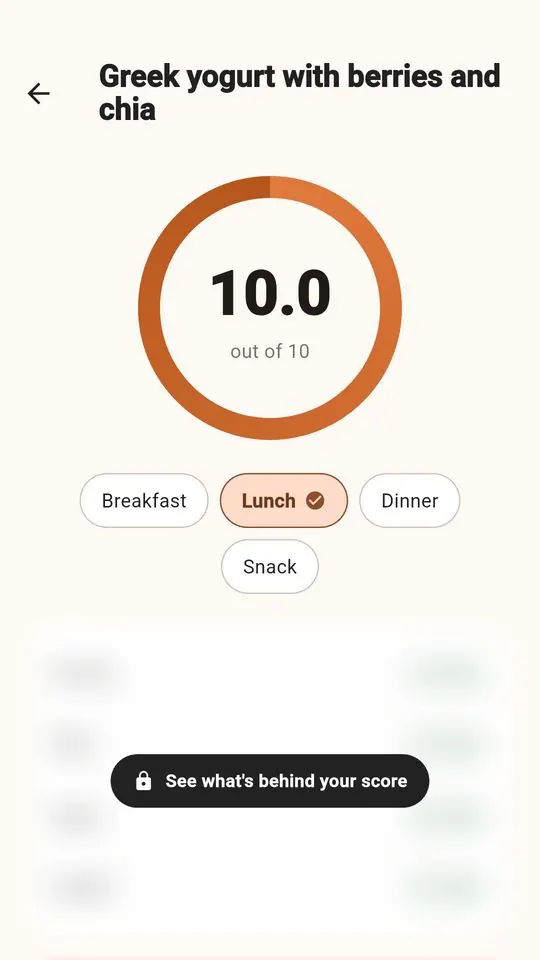
Instead of a calorie total, the meal score runs on four parts: protein, fiber, added sugar and quality — how processed a food is. Protein and fiber each count for 30% of the score, added sugar for 20% and quality for 20%, and the four parts are combined before the final number is rounded for display.
Those four parts come from a photo of your meal, scanned with the food scanner built for PCOS, or from typing a few numbers in by hand — the same process described on the food scanner app page. Either way, the score lands on a 0–10 scale explained in full on the how the score works page, with no calorie total needing to appear on screen at all.
Where is the data you log actually stored?
Meals, weight, cycle days and symptoms you log are stored on the phone, and the app needs no account to work. What happens next depends on how you logged that particular meal.
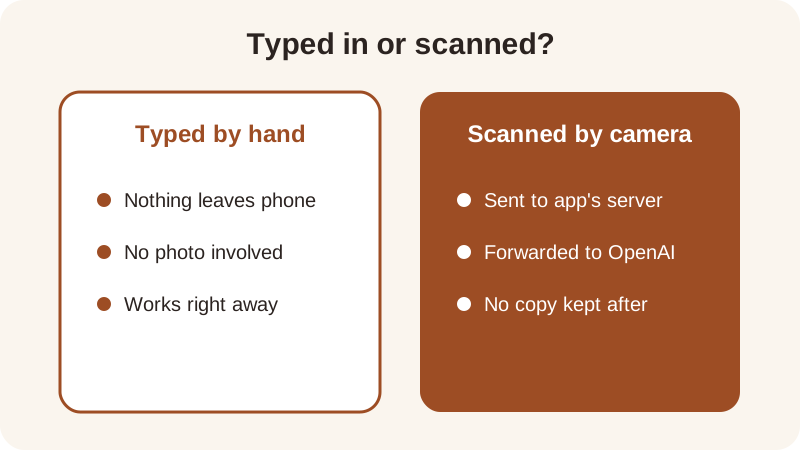
Type a meal in by hand and nothing leaves the phone at all. Scan a meal with the camera instead, and that one photo is sent to the app's server and on to OpenAI to identify the food, and no copy is kept afterward. It's the resulting numbers — protein, fiber, added sugar, quality — that get stored locally with everything else, not the picture itself.
How does Gentle Mode score a meal without using calories?
Gentle Mode still runs the same four-part math behind the scenes; it just never displays calories or a scale anywhere in the app. The protein reference is 7 g per 100 kcal, the fiber reference is 2 g per 100 kcal, and the added-sugar reference is a flat 12 g — general nutrition references this score uses, not thresholds for any one person to hit.
Nutrition figures pulled from a meal photo are estimates — close enough to compare meals against each other, not exact lab values. The photo calorie counter accuracy page goes into more detail on how that estimate is built.
Take Turkey Chili as a worked example: about 36 g protein and 13 g fiber in 480 kcal. Divide each by the calories and multiply by 100, and you get about 7.5 g protein and 2.7 g fiber per 100 kcal — both above the score's references, which is part of why it scores 9.3 out of 10 on the recipe page.
Compare it with Overnight Oats with Chia: about 14 g protein and 10 g fiber in 380 kcal works out to roughly 3.7 g protein and 2.6 g fiber per 100 kcal. Fiber still clears the reference, protein sits below it, and the recipe scores 7.6 — lower than the chili, but still a meal with real fiber in it. Neither recipe needs a calorie goal typed in first; the per-100-kcal math is what moves the score, not a running daily total.
Can you track progress without a scale or counting calories?
Yes — the five rings track protein, fiber, movement, sleep and meals, and none of them touch calories. If you want calories, macros and a weight trend sitting next to the score, Weight Loss Mode adds them; if you don't, Gentle Mode leaves them out entirely.
| Gentle Mode | Weight Loss Mode |
|---|---|
| No calories shown | Shows calories |
| No scale anywhere | Shows macros |
| Meal score shown | Adds weight trend |
| Five rings tracked | Same meal score |
Both modes use the same meal score; only the calorie and scale displays differ.
The choice between modes is a single toggle in settings, not two separate apps, and switching later doesn't erase anything already logged. The PCOS tracker keeps meals, weight, cycle days and symptoms the same way no matter which mode is active. The app is free to start and needs no account, so trying one mode and then the other costs nothing but a tap in settings.
How do you log a meal without weighing or measuring it first?
A meal score doesn't need a kitchen scale any more than it needs a calorie count — a photo or a rough portion estimate is usually enough to place a meal on the 0–10 scale and see which part is pulling it down.
- Take a photo of the plate, or pick a close match from the recipes list.
- Let the scanner estimate protein, fiber, added sugar and how processed the meal is.
- Check the 0–10 score and see which of the four parts is lowest.
- Edit the portion on the score screen if it looks off — the app doesn't remember portions for later photos, so each one starts fresh.
- Try one swap — more fiber, less added sugar, a less processed version — and rescan.
The full method for estimating portions by eye is on the log meals without a scale page, covering hand-based portion sizes for the same foods used throughout the app's recipes.
Which foods score well without needing to count anything?
You don't need a running calorie tally to see which meals score higher — the table below lines up a few of the app's twelve recipes by protein, fiber and final meal score.
| Recipe | Protein | Fiber | Calories | Meal score |
|---|---|---|---|---|
| Edamame with Sea Salt | 17 g | 8 g | 190 kcal | 10.0 |
| Turkey Chili | 36 g | 13 g | 480 kcal | 9.3 |
| Lentil & Spinach Soup | 20 g | 14 g | 340 kcal | 9.2 |
| Overnight Oats with Chia | 14 g | 10 g | 380 kcal | 7.6 |
| Apple with Almond Butter | 6 g | 6 g | 220 kcal | 6.8 |
None of these foods scores higher or lower because it's better or worse to eat — the table only shows which combinations of protein and fiber per calorie lift the score. A meal with more protein and fiber per 100 kcal, and less added sugar, tends to land higher regardless of its total calories, which is part of the point of scoring this way instead of watching one number move across a day.
Try your own plate in the meal score calculator: type the protein, fiber and added sugar instead of a calorie count at all, or lean on a photo scan if typing numbers still feels like a chore. You can also see how any photo-scored meal is broken down part by part on the rate my meal score page.
Frequently asked questions
Does a PCOS weight loss app without calorie counting still track anything?
Yes — the meal score still runs on four parts (protein, fiber, added sugar and quality) and the five rings track protein, fiber, movement, sleep and meals, none of which require a calorie number to appear on screen.
Is a meal photo stored anywhere after it's scanned?
No. A meal photo is sent to the app's server and on to OpenAI to identify the food, and no copy is kept afterward. Logging a meal by hand instead sends nothing off the phone at all.
Where are the meals, weight and cycle days I log stored?
Meals, weight, cycle days and symptoms you log are stored on the phone itself, and there's no account to create. Nothing needs to sync or upload for those typed entries to show up in the app.
Can you switch between Gentle Mode and Weight Loss Mode?
Yes, it's a single toggle in settings rather than two separate apps. Gentle Mode hides calories and the scale; Weight Loss Mode adds both back next to the same meal score. Switching later doesn't erase anything already logged.
Do you need to weigh food to get a usable score?
Not necessarily. A photo or a close portion estimate is usually enough to place a meal on the 0–10 scale. Figures pulled from a photo are estimates — close enough to compare meals, not exact lab values.
General nutrition information, not medical advice. Figures are estimates. Talk to a doctor or dietitian about your own needs.