 PCOS Weight Loss
Photo Food Diary Benefits: What It Actually Shows
An explanation of what a photo food diary actually does — speed, a four-part meal score, and what stays an estimate — compared with typing numbers by hand.
Published
Quick answer
The main photo food diary benefits are speed and a four-part score: one photo becomes a 0–10 score for protein, fiber, added sugar and quality, with no typing. Figures are estimates, but a week of photos shows patterns fast.
Key takeaways
- One photo becomes a 0–10 score for protein, fiber, added sugar and quality in seconds.
- Logging by hand is free with no daily limit; the free photo option scores three photos in any 24 hours.
- A meal photo goes to the app's server and on to OpenAI to identify the food, then no copy is kept.
- The score's references (7 g protein, 2 g fiber per 100 kcal, 12 g added sugar) are general, not clinical targets.
- A week of scored photos can show patterns that a single meal's score can't.
The real photo food diary benefits are speed and detail: one photo turns into a 0–10 meal score for protein, fiber, added sugar and quality, with no typing required.
What does a photo food diary actually do?
A photo of a plate goes to the app, which estimates the food and portion, then builds a score from four parts — protein, fiber, added sugar and quality, or how processed the food is — weighted 30%, 30%, 20% and 20%. The four parts are combined unrounded and only the final number is rounded for display, so what lands on screen is one figure out of 10, explained in full on the how the score works page. That single number replaces the longer habit of writing down every ingredient and looking up its protein and fiber by hand.
Why take a photo of your meal instead of writing it down?
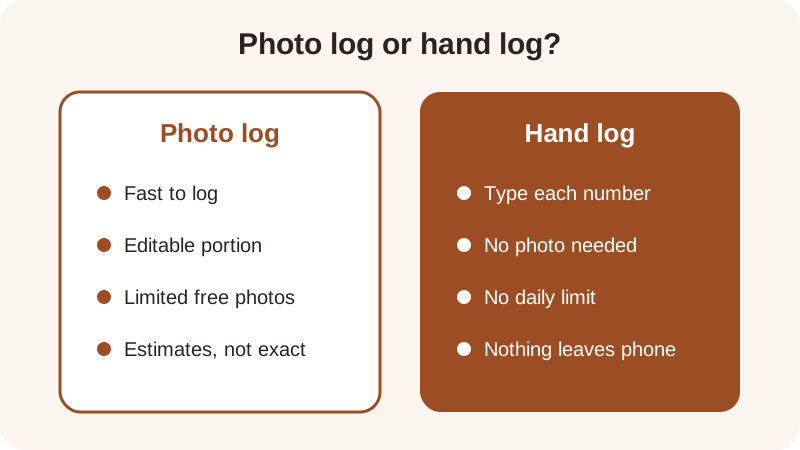
Typing protein, fiber and calories for every meal takes time and some nutrition know-how; a photo skips both steps, at the cost of being an estimate rather than an exact figure — nutrition numbers pulled from a meal photo are estimates, not lab values. That's the center of the photo food diary vs written diary question: speed against precision. For anyone who wants a food diary without judgment, the trade still works, because the score describes grams and percentages — it doesn't rate a meal as good or bad.
The two methods differ in a few concrete ways:
| Question | Photo log | Hand log |
|---|---|---|
| Daily limit on the free version | Three meal photos in any 24 hours | No daily limit |
| Where the food data travels | Sent to the app's server, then on to OpenAI, no copy kept | Nothing leaves the phone |
| What you need to know first | Nothing — the app estimates the food | The protein, fiber and calories, from a label or memory |
| Barcode or label scanning | Not available — no barcode scanner, no label reader | Not applicable |
Logging by hand is free with no daily limit, which suits a meal where the numbers are already known from a label. A photo suits the opposite case — a home-cooked dinner, a restaurant plate, a shared pot of something with no label at all. Plenty of people end up doing both in the same week: a quick photo for the meals that would otherwise go unlogged, and a typed entry for anything with a label already in hand.
What shows up after you snap a photo?
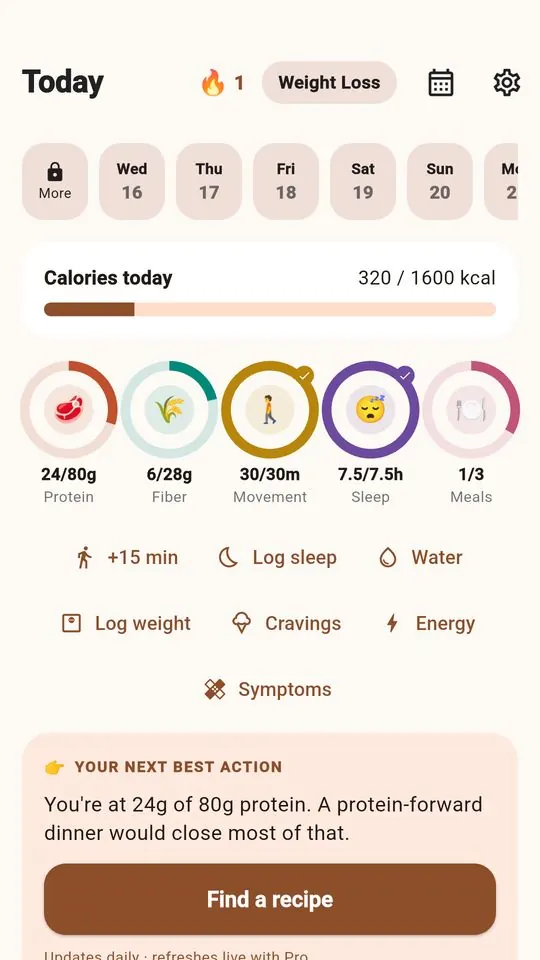
The score screen shows the 0–10 number along with the four parts behind it, and the portion is editable if the plate was smaller or larger than the app guessed — it doesn't remember that portion for the next photo, so every one starts fresh. Five rings also run across the day for protein, fiber, movement, sleep and meals; they're progress rings, separate from the meal score itself.
Two tracking modes sit behind the same score. Gentle Mode has no calories and no scale anywhere in the app, while Weight Loss Mode adds calories, macros and a weight trend next to the score. Neither mode changes how the four-part score itself gets calculated, and switching between them doesn't change what a photo diary shows for protein or fiber on any given plate.
What does a week of scored photos actually show you?
A single photo is one meal, but a run of them starts to show a pattern. Photograph a bowl of turkey chili — about 36 g protein, 13 g fiber, 480 kcal — and the math works out to roughly 7.5 g protein and 2.7 g fiber per 100 kcal, both above the score's references of 7 g protein and 2 g fiber per 100 kcal, which is part of why that recipe lands at 9.3 out of 10. An apple with almond butter — about 6 g protein, 6 g fiber, 220 kcal — comes to about 2.7 g of protein and 2.7 g of fiber per 100 kcal, closer to the fiber reference than the protein one, and scores 6.8.
Seeing both scores side by side in a week's history, rather than doing that arithmetic by hand each time, is where a photo diary earns its keep. The free version shows the last 7 days of that history; PCOS Pro lets you look further back. Try the same math on your own plate with the meal score calculator, or look at a few other recipes already scored this way, like the lentil and spinach soup at 9.2.
Is a photo food diary private?
A meal photo is sent to the app's server and on to OpenAI to identify the food, and no copy is kept afterward. Logging a meal by hand sends nothing off the phone at all, and meals, weight, cycle days and symptoms logged in the app are stored on the phone itself. There's no barcode scanner and no nutrition-label reader built in, so every photo is read as a plate of food, not a product code — more on how that reading works is on the food scanner app page.
The app is free to start and needs no account, so trying a few photos against a few hand-typed meals costs nothing but a little time. Whichever way the numbers get in, they land on the same 0–10 scale, built from the same four parts, every time — which is the point of keeping either kind of diary at all.
Frequently asked questions
What does a photo food diary actually show, compared with a written one?
A photo food diary turns a plate into a 0–10 meal score for protein, fiber, added sugar and quality, plus a portion you can edit. A written diary only holds whatever numbers you type in yourself, so it shows exactly what you looked up — nothing scored automatically.
Is the nutrition data from a meal photo exact?
No — nutrition figures pulled from a meal photo are estimates, built from what the photo shows and the portion you confirm. They're useful for comparing meals against each other and against the score's references, not as a precise lab-grade count.
Is a photo food diary private?
A meal photo is sent to the app's server and on to OpenAI to identify the food, and no copy is kept afterward. Logging a meal by hand sends nothing off the phone, and meals, weight, cycle days and symptoms you log are stored on the phone itself.
How many meal photos can I score for free?
The free version scores three meal photos in any 24 hours; PCOS Pro removes that limit. Logging a meal by hand has no daily limit at any time, so a photo diary and a hand-typed diary can run side by side without hitting a wall.
Does a photo food diary track weight loss?
That depends on the mode. Weight Loss Mode shows calories, macros and a weight trend next to the meal score. Gentle Mode has no calories and no scale anywhere in the app. Both modes use the same four-part meal score underneath, just with different extras next to it.
General nutrition information, not medical advice. Figures are estimates. Talk to a doctor or dietitian about your own needs.