 PCOS Weight Loss
How to Use a Food Diary Effectively
A practical guide to using a food diary effectively with photo or hand logging, the four-part meal score, and Gentle Mode instead of calorie counting.
Published
Quick answer
Use a food diary effectively by logging every meal the same way, photo or by hand, and reading the four-part meal score — protein, fiber, added sugar, quality — instead of one calorie total.
Key takeaways
- Log every meal the same way so entries are comparable across the week
- Read all four score parts — protein, fiber, added sugar, quality — not just one
- Photo logging is estimated and sends the image to OpenAI; hand logging stays on the phone
- Gentle Mode drops calories and the scale; Weight Loss Mode keeps them next to the score
- Check the 7-day pattern instead of judging any single meal
How to use a food diary effectively comes down to three habits: log every meal the same way, read all four parts of the score instead of one calorie total, and check the pattern across several days rather than judging any single plate.
A diary that only tracks calories misses whether a day had much protein or fiber in it, and it says nothing about added sugar or how processed a meal was. The meal score looks at all four of those — protein, fiber, added sugar and quality — then combines them into one 0–10 number, so a diary built around it shows more than a running total ever could.
What should you actually write down in a food diary?
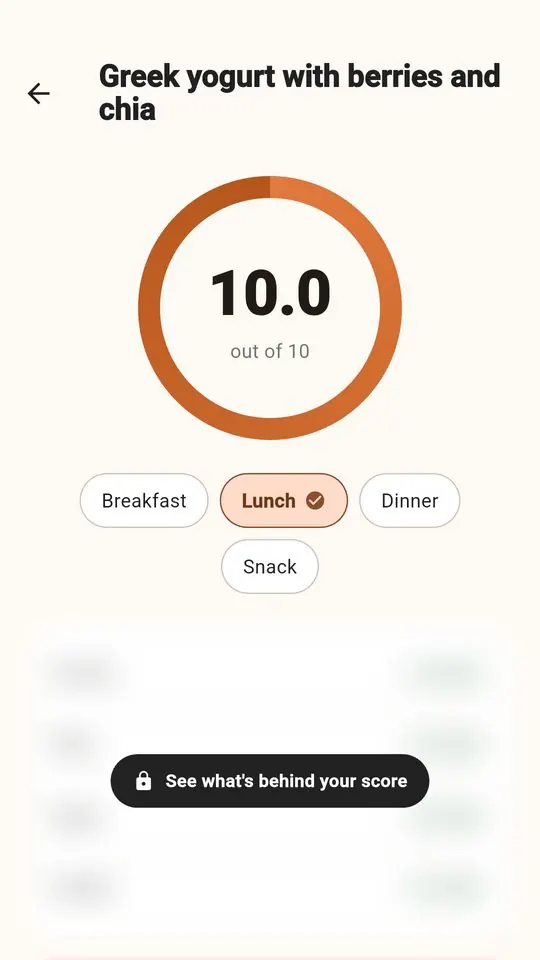
Write the food, a rough portion, and roughly when you ate it. That's enough for the app to work out protein, fiber, added sugar and quality, which it combines unrounded before rounding only the final score for display.
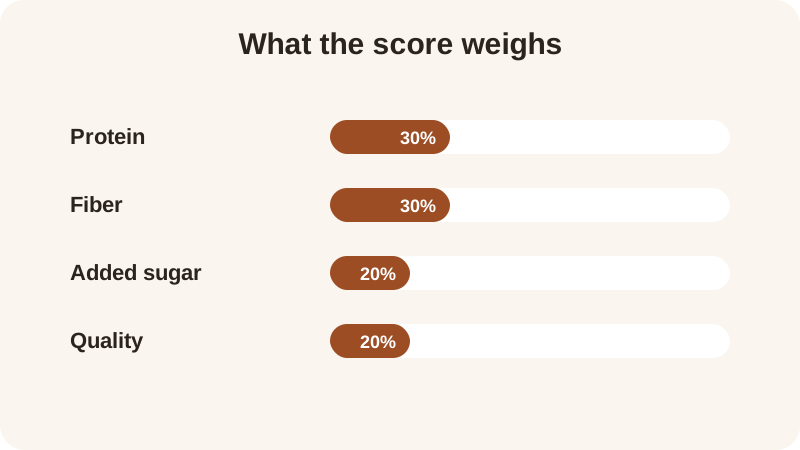
The protein part compares a meal to 7 g of protein per 100 kcal, the fiber part to 2 g of fiber per 100 kcal, and the added-sugar part to a flat 12 g — these are the general nutrition references this score uses, not a target for any one meal. A photo is sent to the app's server and on to OpenAI to identify the food, and the resulting figures are estimates; no copy of the photo is kept. Logging by hand is free, has no daily limit, and sends nothing off the phone. Both count as the same diary — the food scanner just saves you typing, and plenty of people mix the two, photographing a plate at a desk and typing in a meal cooked at home.
How do you keep a food diary going without it feeling like another diet app?
Pick a mode and let it do the stripping-down for you. Gentle Mode has no calories and no scale anywhere in the app, so the diary becomes a list of what you ate and how it scored, nothing else. Weight Loss Mode shows calories, macros and a weight trend next to the score, for anyone who wants that layer.
The five rings — protein, fiber, movement, sleep and meals — are progress rings, not part of the meal score itself, so they track whether you showed up for the day rather than grading what you ate. Some people find that rings-only view easier to keep open than any running number. You can try the difference on the Gentle Mode page.
What are the steps to using a food diary effectively?
A food diary is only as useful as the routine around it. These five steps keep entries comparable from one day to the next, which is what makes a week of entries worth reading back.
- Log every meal the same way for about a week before drawing any conclusion from it.
- Read the protein, fiber, added sugar and quality parts, not just the final number.
- Edit the portion on the score screen each time — the app does not remember a portion for the next photo.
- Scroll back through the last 7 days of history to look for a pattern, like fiber running low most mornings.
- Pick Gentle Mode or Weight Loss Mode once and stay with it, so the week's entries are measuring the same thing.
Patterns are easier to see side by side than in a single day's total. A few of the site's twelve recipes, each with its own 0–10 meal score, show how different the same kind of meal can look once protein and fiber are written out next to it:
| Meal | Protein | Fiber | Meal score |
|---|---|---|---|
| Edamame with Sea Salt | 17 g | 8 g | 10.0 |
| Turkey Chili | 36 g | 13 g | 9.3 |
| Overnight Oats with Chia | 14 g | 10 g | 7.6 |
| Apple with Almond Butter | 6 g | 6 g | 6.8 |
None of these scores means the lower-scoring food was a wrong choice for that day — a diary that shows the full spread like this is doing its job. Written side by side like this, a week of entries tells you a lot more than any single meal can.
What's the most common food diary mistake?
Judging one meal instead of the week around it. A single lower-scoring snack says very little on its own; a diary is more useful read as a 7-day stretch than as a single entry, since one meal rarely tells you anything a pattern wouldn't show more clearly.
A second mistake sits right next to that one: switching modes or logging methods halfway through the week and then comparing the numbers as if nothing changed. A photo-logged breakfast and a hand-logged dinner can both go into the same diary, but a week that starts in Weight Loss Mode and ends in Gentle Mode will read as two different diaries, not one.
Should a food diary track calories or just the meal score?
That's really a choice between the two modes rather than a right answer. Weight Loss Mode keeps calories, macros and a weight trend sitting next to the score for anyone who wants that detail logged alongside it. Gentle Mode leaves calories and the scale out of the app entirely, so the diary is just food and its score.
Either way, the app is free to start and needs no account, so it costs nothing to try a few days of each mode and see which one you keep opening. You can see exactly how the four parts combine on the how the score works page, or try a meal of your own in the meal score calculator before you start your diary.
Frequently asked questions
How to use a food diary effectively without obsessing over every number?
Log meals the same way each time, by photo or by hand, and look at the 0–10 meal score instead of a running calorie total. Gentle Mode shows no calories and no scale at all, so the diary can stay about food instead of a tally.
Is a photo food diary or a written one more effective?
Both work, as long as you stay consistent. A photo is sent to the app's server and on to OpenAI to identify the food, with no copy kept, while logging by hand sends nothing off the phone and has no daily limit.
How many days of a food diary do you need before it's useful?
The free version shows the last 7 days of history, which is usually enough to notice a pattern across meals, like fiber being low most mornings. PCOS Pro lets you look further back if you want a longer view.
Should a food diary include calories or just the meal score?
That depends on which mode you pick. Weight Loss Mode shows calories, macros and a weight trend next to the score, while Gentle Mode leaves calories and the scale out of the app entirely.
What's a common mistake people make with a food diary?
Logging only the meals that look good on paper, or judging one meal instead of the pattern across several days. The score's references are general nutrition references, not a pass-or-fail line for any single plate.
General nutrition information, not medical advice. Figures are estimates. Talk to a doctor or dietitian about your own needs.